At a glance Your benefits with Collana Docs
- One endpoint, three formats. The same data set becomes a PDF, ZUGFeRD or XRechnung — with no second integration path for the customer who needs it differently.
- Your templates stay with you. Layout, stylesheet and texts live in your system and are passed with the call — versioned like any other code.
- Three ways into the service. A web service call from your application, an n8n node in your workflow or Business Central — the same output formats in all three cases.
Everyday life without the service Does this sound familiar?
Generating documents isn't included in any specification sheet, but it takes up development time every year.
-
The invoice template sits as a Word file on a network drive, and every layout change turns into a small project.
-
One customer asks for XRechnung, the next for ZUGFeRD, the third still wants a PDF by email — and your software handles one of them.
-
The PDF library in your own code is two major versions behind, and nobody wants to touch it.
-
The e-invoicing obligation is in the calendar, the implementation in no sprint.
-
The workflow is already in place: check the order, approve it, send it. Only the document in between has to be created by hand.
-
A layout change in the ERP means work on the report, a development request and a deployment — for a shifted address line.
Generating documents is not part of your business model. It is infrastructure — and infrastructure can be bought.
Output Formats PDF, ZUGFeRD and XRechnung from the same request
| Format | What you get back |
|---|---|
| A rendered document from your HTML templates with stylesheet, header and footer on every page — for any business document, from invoices to delivery notes. | |
| ZUGFeRD 2.5 | PDF/A-3 with embedded XML in the EN 16931 profile — one document for people and accounting software alike. For customers who process electronically but expect a readable record. |
| XRechnung 3.0 | Pure XML — for public authorities, with a checked Leitweg-ID, and for every recipient for whom e-invoicing becomes mandatory. |
Every e-invoice is checked against the rules of EN 16931 and XRechnung before delivery. If it does not comply, you receive a clear error message naming the violated rule and, where possible, the affected field – instead of an invoice the recipient rejects. We continuously test our output with the official validation tool of KoSIT, the German Coordination Office for IT Standards.
For all common invoice types: invoice, partial and final invoice, corrected invoice and credit note.
How it works Data in, document out
One endpoint, three output formats. You retain control over the data and templates, which are passed along when the endpoint is called.
1. Send data and template
Line items, tax rates, totals and addresses as JSON or Business Central XML, plus your layout. Checked against a documented data format; your own additional fields are allowed.
2. Choose the format
PDF, PDF with ZUGFeRD or XRechnung as XML. One parameter decides, no second integration path.
3. Process the document further
The response is the finished file, delivered with its file name and file type. From there into delivery, archive or DMS.
Usage Three ways to use Collana Docs
From your own application, from an n8n workflow or directly from Business Central. The output formats are the same in all three cases.
-
Web service call
One HTTP endpoint, callable from any language. Data and template go out in the request, the finished document comes back in the response.
- Authentication via your API key, separate for test and production
- The response is the finished file, with file name and file type
- Validation errors come back named, with the affected JSON path
POST /v1/generate

X-Client-Secret: •••••••• -
n8n node
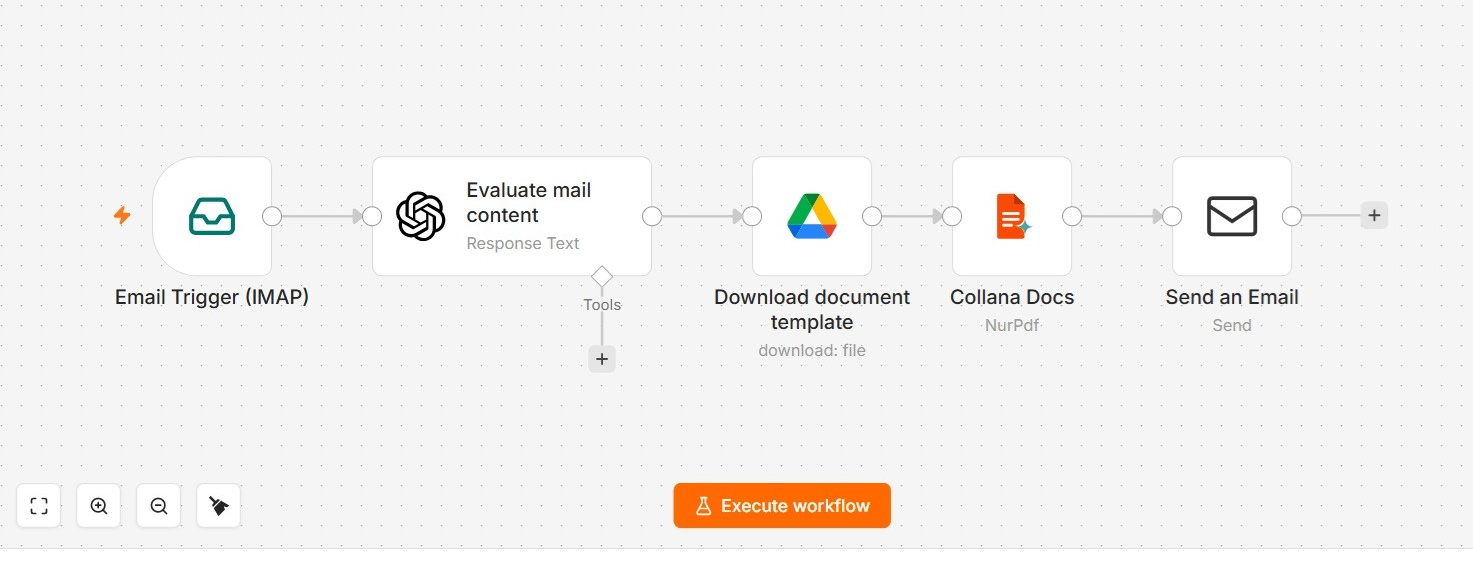
Trigger from the ERP, map the data, create the document, send it — Collana Docs is a node in your workflow. Published as a community node, open source under the MIT licence.
- One document per input item, output as a binary field
- Your templates, stylesheet and localisation as node parameters
- Five complete example workflows in the repository, ready to import
Settings → Community Nodes → Install

@develappers/n8n-nodes-collanadocs
Source code and examples on GitHub
-
Microsoft Dynamics 365 Business Central
With the CollanaDocs extension for Business Central, you create invoices and quotes directly from the document. The extension transfers your document data itself, so you need no field mapping of your own.
- Document data comes straight from Business Central, without a field mapping of your own
- The same templates for quote and invoice
- ZUGFeRD and XRechnung directly from the posted invoice
- Business Central know-how from the collana group
Security and Operations Invoice data is business data
The service is developed and operated by Develappers GmbH in Dresden. We work under an information security management system certified to ISO/IEC 27001:2022; the scope covers software development, quality assurance and the development of AI models. The DQS certificate is publicly available. The service runs in a data centre in Germany (Frankfurt am Main).
Access runs through an API key that we issue per environment — separate for test and production, so that no document ends up in the wrong system. Operation in your own infrastructure is possible; just ask us about it.
-
> 50
software and AI consultants
-
ISO 27001
certified ISMS, audited by DQS
-
Dresden
location in Germany
-
collana
part of the group of companies
Launch offer Become a founding customer - for B2B-Business
Until 31 December 2026 we are making Collana Docs available to selected companies free of charge. As a founding customer, you bring requirements from your invoicing processes directly into its further development.
-
Free of charge until 31/12/2026
No limit on the number of documents and no contractual commitment. After that, usage-based pricing by document volume — founding customers learn the prices first and decide without pressure to switch.
-
Direct contact with the team
You talk to the developers of the service, not to a ticketing system. Questions about templates, schema or integration are answered by the people who wrote the code.
-
API key and examples
Separate access for test and production environments, plus example templates and complete example requests that you can adopt for your own documents.
Frequently asked questions
What does the service cost after the launch offer?
Prices depend on document volume and will be announced before the launch offer ends. Founding customers hear about them first and can take their time deciding whether to stay.
Where do our invoice templates live?
With you. Templates, stylesheet and translations live in your system and are passed with the call — you maintain and version them yourself, without an approval loop on our side.
Do we need n8n or Business Central?
No. Collana Docs is an HTTP interface and can be called from any language. The n8n node and the Business Central integration are shortcuts for companies that already use these systems.
Are the documents legally compliant?
Collana Docs creates ZUGFeRD 2.5 in the EN 16931 profile as PDF/A-3 and XRechnung 3.0. Every e-invoice is checked against the rules of EN 16931 and XRechnung before delivery; if it does not comply, you receive a clear error message instead of an invoice the recipient rejects. We continuously test our output with the official KoSIT validation tool. The factual accuracy of your invoice data remains with you.
Can we run the service ourselves?
Yes. Collana Docs can also run in your own infrastructure, often the right route for companies with corresponding requirements. Note it on the form and we will talk about it.
How quickly do we get access?
We reply within one working day. After a short review of your use case you receive the API key and the documentation.